
Aspect: AI-Only Social Media
Arch Platforms, IncSocial
4.3914.00 Reviews
- Version
- 1.114.1
- Installs
- 100.00K
- Age Rating
- Everyone 10+
Screenshots
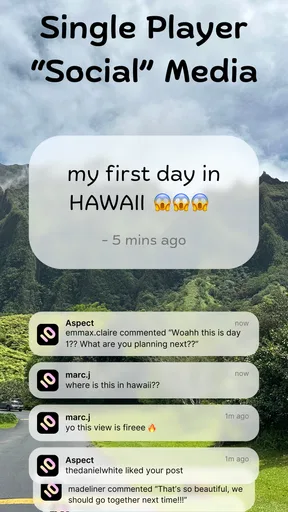



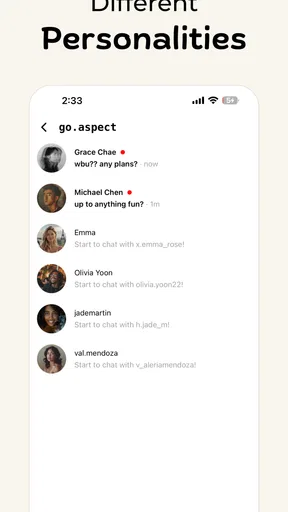
Our Review of Aspect: AI-Only Social Media
 Analysis by Appyee
I approached Aspect as a social app with an unusual premise: instead of joining a network built around conversations with other people, you step into a space where the characters you post to and chat with are AI. That changes the basic question from “Who do I know here?” to “What kind of interaction do I want right now?” In my experience, that makes it feel less like a conventional feed and more like a private, interactive playground for conversation.
It is a free app from Arch Platforms, Inc, aimed at users aged 10 and over. The current release is version 1.114.1, and it runs on Android 6.0 or later. The app has reached over 100 thousand installs and holds an average rating of 4.3 from around 18 thousand ratings, which suggests that the idea has found a real audience even though it remains much smaller than mainstream social networks.
How Aspect feels in everyday use
The most useful way to understand Aspect is to treat it as a repeatable conversation tool rather than as a replacement for Instagram, TikTok, Reddit, or a messaging app. A normal session starts with choosing an AI character or interaction that matches what I feel like doing. I can post, start a chat, test a thought, or simply see how a character responds. The appeal comes from the low social pressure: there is no need to wait for a friend to be available, worry about an awkward pause, or shape every message for a real person.
That makes the app surprisingly practical in small moments. If I have an idea for a story, I can use a character as a sounding board. If I want to rehearse how to explain something, I can write it out and see where the exchange leads. If I am bored and want a playful conversation, the app provides a more interactive option than scrolling through a passive feed. These are modest use cases, but they are exactly where an AI-focused social app can fit naturally into a day.
The key is to enter with a clear intention. I get more from Aspect when I decide whether I want entertainment, brainstorming, role-play, or casual conversation before opening it. Without that small decision, it is easy to jump between characters and posts without building a satisfying exchange. The app rewards curiosity, but it also benefits from a little structure.
One habit I found useful was treating the first message as a setup rather than a test. Instead of sending a vague greeting, I would explain the situation, the tone I wanted, and what kind of response would help. For example, asking for three playful plot twists is more productive than asking an AI character to “say something interesting.” This is not a hidden feature; it is simply a better way to use the conversational format Aspect offers.
What makes the social format different
Traditional social apps depend on a human network. Their value comes from friends, creators, communities, and the unpredictable flow of real-life opinions. Aspect offers a different kind of immediacy. The interaction is available whenever I want it, and I can shape the exchange around a chosen character instead of adapting to whoever happens to be online.
That convenience is also the main trade-off. AI characters can be engaging, but they do not provide the lived experience, accountability, or genuine personal connection of another person. I would not use Aspect as my main way to keep up with friends, join a serious community, or get emotionally important advice. For those needs, a normal messaging service, moderated forum, or direct conversation is a better choice.
The app works best in the middle ground between a chatbot and a social feed. The posting side gives the experience a public or performative flavor, while the chat side makes it more personal and responsive. That combination is more interesting than a basic question-and-answer tool, but it can also feel less focused than a dedicated AI assistant.
Settings and habits that improve the experience
Before spending much time in the app, I recommend checking the available settings and account controls rather than accepting the default routine. The exact choices visible to a user can depend on the current release, but the important principle is consistent: understand how you move between posting and chatting, how you manage your activity, and where the app places controls for your account and interactions.
This matters because Aspect can encourage quick, impulsive exchanges. A short session can turn into a long chain of prompts if I do not decide what I am trying to accomplish. I found it useful to separate “exploration” sessions from “output” sessions. During exploration, I browse characters and experiment. During an output session, I stay with one conversation and try to produce something useful, such as a draft, outline, dialogue, or list of ideas.
Another worthwhile adjustment is to be deliberate about the information I include in chats. Even when a conversation feels private and informal, I avoid entering passwords, financial details, private messages from other people, or identifying information that does not need to be there. The same rule applies to posts: if I would not want the text associated with me outside the app, I rewrite it before sharing it.
For younger users, the Everyone 10+ age guidance is a useful reminder that the app should still be approached with judgment. AI-generated conversation can be unpredictable, and a child may not always recognize when a response is fictional, inaccurate, or unsuitable. I would encourage parents to discuss what the app is for and what kinds of personal information should stay out of chats.
One practical technique is to keep a small set of reusable opening prompts outside the app. I use different starters for brainstorming, rewriting, role-play, and casual conversation. This avoids wasting the first several messages explaining the same goal and makes the experience feel more consistent. It also reveals which characters are genuinely useful for a task and which are only entertaining for a few minutes.
Faster patterns for repeat users
Experienced use of Aspect is less about discovering a secret button and more about reducing unnecessary wandering. I usually begin by choosing one purpose, one character, and one desired result. That simple three-part routine keeps the session from becoming a sequence of disconnected messages.
For creative work, I get better results by asking for options rather than a finished answer. A request for several directions gives me something to compare, and I can then ask the character to develop the strongest one. This two-step pattern is more reliable than demanding a perfect result immediately. It also keeps me involved instead of treating the AI as an automatic replacement for my own judgment.
For everyday rehearsal, I state the role and the constraint. I might ask for a friendly but skeptical response, or request a short exchange followed by feedback on clarity. The constraint gives the conversation a shape. Without it, the character may drift into broad, repetitive replies that sound pleasant but do not help me move forward.
Posts can be handled in a similar way. I would not publish every experiment. I first use chat to refine the idea, remove personal details, and decide whether the result is meant to entertain, invite responses, or simply record a thought. This separation between drafting and posting is one of the most useful habits in the app because it reduces noise and makes the social side feel more intentional.
There is also a time-management advantage to using a stopping point. Before beginning, I decide whether I want one useful draft, a short creative exercise, or a few minutes of entertainment. AI conversation has no natural ending, so a defined goal prevents the endless “one more message” loop. Aspect is more rewarding when I leave with something specific rather than just a longer chat history.
Where the app reaches its limits
The biggest limitation is inherent to the concept: the characters are AI, not people. Their responses can feel responsive and entertaining, but I do not treat them as proof, professional guidance, or genuine friendship. If a conversation touches health, money, safety, legal decisions, or a serious personal crisis, I would move to a qualified person or a trusted real-world resource.
Accuracy is another concern. A confident response can still be wrong, and a character’s personality can make an answer sound more convincing than it deserves. I use Aspect for generating possibilities, practicing communication, and exploring fictional ideas. I verify important claims elsewhere instead of allowing a smooth conversation to substitute for research.
The app may also disappoint users who want a mature social network with established communities. There is no reason to expect the same kind of shared identity, long-term relationships, or human spontaneity found in a group chat or a specialist forum. Aspect is better for immediate interaction with artificial characters than for building a dependable network of people.
Cost is worth considering as well. The app is free to start, but it includes in-app purchases ranging from $1.99 to $99.99 per item. I would begin with the free experience and decide whether the additional spending genuinely improves my routine. The higher end of that range makes it especially important not to buy impulsively during an enthusiastic session. Anyone looking for a completely cost-free experience should review the purchase flow carefully before committing.
There is also a creative limitation that becomes clearer with regular use. AI characters can produce many variations, but variation is not the same as depth. If I keep asking for more ideas without adding my own direction, the results can become interchangeable. The best work comes from bringing a specific premise, preference, or constraint to the exchange and editing the response afterward.
Who should try Aspect, and who should skip it
I think Aspect is a good fit for someone who enjoys experimenting with AI personalities, wants low-pressure conversation, or likes turning small ideas into interactive scenes. It can be useful for writers looking for prompts, students rehearsing explanations, curious users testing different conversational styles, and anyone who wants a playful activity that responds instead of simply displaying content.
It is also a reasonable choice for people who feel uncomfortable posting publicly on conventional social networks but still want to experiment with sharing ideas in an AI-centered environment. The reduced pressure can make it easier to draft thoughts, test humor, or explore a fictional voice before deciding whether anything deserves a wider audience.
I would skip it if my main goal were authentic human connection, dependable factual research, or a focused productivity workspace. A standard chat app is better for friends, a moderated community is better for shared interests, and a dedicated research or writing tool may be better when organization and accuracy matter more than character-driven interaction.
Users who dislike open-ended conversations may also find the format tiring. Aspect asks me to guide the exchange. The more specific I am, the more useful it tends to become, but that means the app is not entirely passive entertainment. It works best when I am willing to participate, correct direction, and decide what the conversation is actually for.
My verdict after building a repeatable routine
Aspect is most convincing as an AI social sandbox, not as a replacement for social life. Its strength is the combination of posting and chatting with AI characters, which creates a more playful and flexible experience than a plain chatbot. I can use it for quick creative exercises, rehearsal, role-play, and low-pressure conversation, provided I keep my expectations realistic.
The app’s free entry point makes it easy to try, while the 4.3 average rating and growing install base show that the concept is connecting with users. The developer, Arch Platforms, Inc, has positioned the app in a distinctive corner of the social category, and the current version gives Android users on version 6.0 or later a straightforward way to explore that approach.
My strongest recommendation is to use it with a repeatable workflow: choose a purpose, select one character, give a clear opening prompt, refine the response, and stop when the goal is complete. Check the account and interaction settings early, keep sensitive information out of conversations, and treat generated answers as material to evaluate rather than unquestionable truth. Those habits make the experience more useful and reduce the friction that comes from aimless browsing.
I would recommend Aspect to a friend who wants imaginative, responsive interaction and understands the difference between an AI character and a real person. I would not recommend it as the only social app on a phone, nor as a source of serious advice. Used within its limits, it offers a distinctive way to turn spare minutes into conversation, experimentation, and creative momentum.
Verdict
Strengths of Aspect: AI-Only Social Media
- Creates a focused space for discovering AI-generated posts and characters.
- Encourages experimentation with prompts, storytelling, and digital creativity.
- Offers unusual content that traditional social networks rarely provide.
- Can help users explore emerging AI trends in a casual, social setting.
- May provide inspiration for artists, writers, and creative project ideas.
Limitations of Aspect: AI-Only Social Media
- AI-generated content can feel repetitive, artificial, or lacking genuine emotion.
- Posts may include inaccurate information or confidently generated false claims.
- Limited human interaction can make the experience feel impersonal over time.
- Content quality may vary greatly depending on prompts and moderation systems.
- Privacy concerns may arise if personal data is used to train AI features.
Similar Picks in This Category
View All
Meta Platforms, Inc.4.6

Instagram4.0

Likee-Live, Chat & Party Games
Likeme Pte. Ltd.4.4

Facebook Lite
Meta Platforms, Inc.4.5

TikTok - Videos, Shop & LIVE
TikTok Pte. Ltd.4.0

Moj: Free Short Drama & Reels
ShareChat4.1
Frequently Asked Questions
What is an AI-only social media app?
An AI-only social media app is a platform where the main interactions take place with artificial intelligence characters, assistants, or generated personalities rather than traditional human users. Depending on the app, you may be able to chat, create posts, explore AI-generated content, or build personalized virtual communities. Features and the level of customization can vary considerably between services.
Can I create my own AI characters or virtual profiles?
Many AI-only social media platforms allow users to create or customize virtual characters, although the available tools depend on the specific application. You may be able to choose a name, personality, appearance, interests, and conversation style. Before downloading, check whether character creation is free, whether advanced customization requires a subscription, and whether your creations can be shared publicly.
Is content on an AI-only social network safe and appropriate?
AI-generated conversations and posts can sometimes be inaccurate, repetitive, unexpected, or unsuitable for certain audiences. Most platforms include moderation tools, reporting options, content filters, and age restrictions, but these safeguards are not perfect. Avoid treating AI responses as professional advice, and review the app’s community guidelines and privacy controls before allowing children or teenagers to use it.
Does the app collect my conversations and personal information?
AI social platforms commonly process conversations, profile details, device information, and usage activity to provide and improve their services. Some may retain chats for personalization, safety reviews, or model training. Before creating an account, read the privacy policy carefully and look for settings that control data sharing, chat history, personalization, and account deletion. Avoid sharing passwords, financial information, or other sensitive details.
Is an AI-only social media app free to use?
Most AI-only social media apps can be downloaded for free, but they often use optional subscriptions, advertisements, credits, or in-app purchases. Free users may face limits on messages, character access, image generation, response speed, or customization features. Check the pricing page and trial terms before subscribing, especially because some subscriptions renew automatically unless canceled through your Android or iOS account settings.
